Okay, this time we will try to install xampp or AppServ on your PC or Notebook with Windows Operating System in it. This post relates to my previous post "Reviewing Web Server Package". So if you do not know about web server package, please see that posting. You can also get the download link of the Webserver Package Installation.
To the installations step, just follow the steps below. I'll try to make it easy as possible. Check this out. :)
After you finish downloading the webserver package either XAMPP or AppServ, double clik it.
XAMPP Installation
If the XAMPP select language appear, it means your XAMMP is ready to use and settings have been going well.
AppServ Installation
Installing appserv has no different way from installing xampp. To install AppServ, please follow the guidelines below:

That's it, how to install Local Server on our PC or Notebook. This local server will use to parse the PHP script.
In next post, we will begin to make a PHP document. Thank you all
At last, Happy Codding All. :)
To the installations step, just follow the steps below. I'll try to make it easy as possible. Check this out. :)
After you finish downloading the webserver package either XAMPP or AppServ, double clik it.
XAMPP Installation
- After you got the installation menu, specify wich drive will be installed by Xampp. Better let it remain on drive "C: /". Then click install:

- Wait until the installation process is complete.

- Next you will be asked to do the XAMPP settings through the "Windows Command Prompt". Follow step 4 to 9 :
- Type "y" when you got the question "Should I add shortcuts to the StartMenu / desktop? (y / n): "Continue to press the ENTER key.
- Type "y" on the next question "Should I procedd? (y / x = exit setup): ". Continue to press the ENTER key.
- Type "n" on the question "your choice? (y / n): ". Continue to press the ENTER key.
- XAMPP is ready for use. Press the ENTER button to perform the automatic setting php.ini and my.ini.
- Press the ENTER button again to resume, type "x" for the question "Please choice (1-7 / x):".
- Finally, to end the installing process and setting XAMPP by once again pressing the ENTER key.
- After installation is complete, go to the Xampp Control Panel.

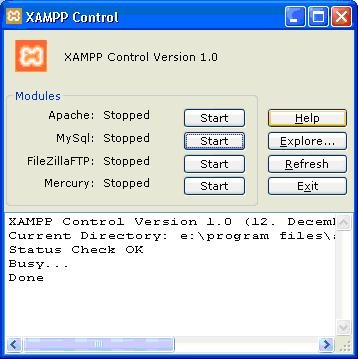
- Check the Apache and MySql list, then click the start button in each section as well. The result will be like this:

- And, Xampp are ready to use.


If the XAMPP select language appear, it means your XAMMP is ready to use and settings have been going well.
AppServ Installation
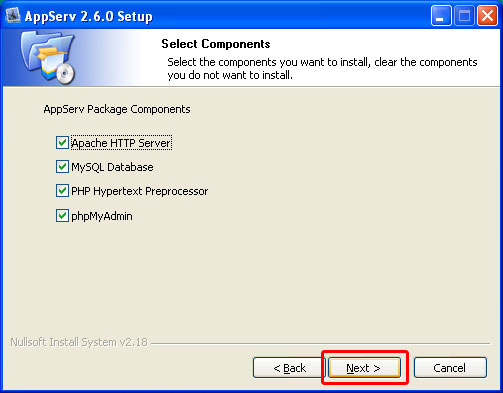
Installing appserv has no different way from installing xampp. To install AppServ, please follow the guidelines below:
- Klik File Appserv yang didownload, lalu Klik Next.

- Click I agree.

- Click Next.

- Click Next again. :)

- Take this setting :
Server Name = localhost | Email = Isikan Email Anda | Port = 80

- Fill in Password column with a password that you want, Re-enter the password, then click Install.

- After the installation process is complete, click Finish.



That's it, how to install Local Server on our PC or Notebook. This local server will use to parse the PHP script.
In next post, we will begin to make a PHP document. Thank you all
At last, Happy Codding All. :)